CENTROID'S

T-400

2-Axis Lathe Control
714 528-7061

Download  T-400 literature in .PDF format (138k)    Download ACROBAT READER

    Conversational Programming

Program parts right at the control with Centroid’s conversational programming feature. No G-codes to learn or memorize. Instantly see any changes you make to the part graphically. Conversational leads you through programming your part. Just fill in the blanks and check the graphics. G-codes are created automatically! Select from these canned cycles: Profiling, (material removing, roughing and finishing), Cutoff, Grooving, Threading, Line, Arc, Drilling and Floating-tapping, Automatic Blending (connecting radius), Chamfering, and Blended Chamfer. If dimensions are missing from your part, Math Help will solve for any unknown points. 

Automatic constant surface speed control

The spindle automatically changes RPM to provide the correct surface speed that you have specified over the entire part, ensuring a better surface finish, superior turning, and longer tool life. Surface speed is also manually adjustable with the spindle speed override knob while the program is running.

Tool Path Graphics

The T-400 will graph all tool movements of the program. The dry run graphing speed is user adjustable with the feedrate override knob. You can start and stop the dry run at any point or display only a portion of the program. The graphics dry run checks for overtravel in the program and will display the exact line number of the overtravel event, saving time and materials. It is scaled on both axes so you can determine the part size. Dry run displays the line of G-code being executed for easy reference when editing and it will accurately estimate the job run time.

Easy to read operator's display

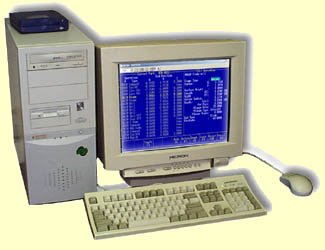
The standard high-resolution, non-glare, color LCD screen displays: tool position (DRO) at all times, spindle RPM, cutting feedrate, and a parts counter with timer. While viewing a program graphically, you can distinguish between rapid moves, feedrate moves, and cutter comp moves by the different colored lines.

Dedicated, easy-to-understand 
control panel
Separate dedicated directional jog keys for both X and Z make jogging the machine a one-button operation. The coolant-proof, sealed, full-size alphanumeric keypad has tactile feedback for solid, confident operation. 

Simple setup

Easy to use graphical menus guide you through part and tool setup. The T-400 remembers the zero position and tool library even after you turn the machine off, so once you have set a tool or part position, you'll never need to reset it. 

 Profiling

Automatic material removal saves you time by generating all the commands to remove excess material from stock. Profiles are defined by simple lines and arcs. Then, the material around the profile is automatically “cleaned out.” The Roughing and Finish Pass can be completed with the same tool or with different tools. 

Drilling and Tapping

Canned drilling cycles include: Peck drilling (chip breaking), Deep Hole drilling (chip removal), and Drilling. Use a tap to make threads with the canned Floating-tapping cycle. Specify the threads per inch, the spindle speed and the depth and the control does the rest. 

Threading

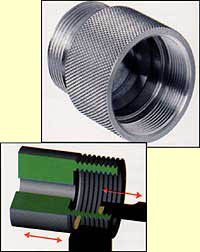
The T-400 canned threading cycles include Inside, Outside, Compound and Tapered threads. Simply select the type of thread needed and enter the pitch, the diameter and the length. Conversational will automatically generate all the G-codes necessary to make the threads.

Tapering

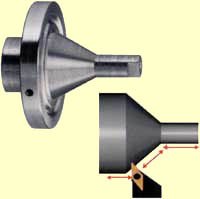
Add any taper, at any angle, to your part by simply specifying a start point and an endpoint OR use the angle and length of the taper. Conversational will automatically calculate any unknown values. Automatic multi-pass repeat-to-depth generates all the commands to cut a perfect taper.

Grooving

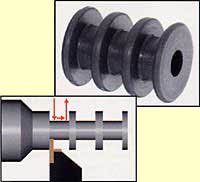
The Grooving canned cycle can make Straight, Chamfered or Radiused Grooves. Automatic multi-pass repeat to a specified depth ensures proper material removal and finish.

Tool Check

Stop the job at any point to measure your part or reset a tool and restart right where you left off, or anywhere you need to restart a tool.

Off-line Conversational Programming

Create and verify part programs away from the machine. Use any PC to program with Centroid's offline conversational lathe software.

 
Machines in Motion's experience in CNC control replacement can benefit your business. 
 Call us  (714) 528-7061

 
Put us to work for you 
cnc mill, cnc retrofit, cnc control, cnc machine

cnc mill, cnc retrofit, cnc control, cnc machine

| Controls Home page | New Machinery page | Restored Machinery page | CNC Components |
| Sharnoa machine & control parts | Do it your self CNC kit | On-site service |
| Centroid cnc controls | M-400ATC | M-400 | M-39 | T-400 | T-39 | NEWS | Why Centroid |
| Centroid control Options | BobCad | Intercon off-line | Digitizing | Probing | TT-1 Tool touch-off |
| Lathe tool Turret | VacuVise | Rotary tables | Gallery of completed installations |
| Engraving Software | CHNC Package | Downloads page | Order Your new cnc control Today |

Contact us directly or Email us at sales@ www.cnc-machine-controls.com
(c) Copyright 2004 Machines in Motion